And BTW the problems from here and here seem also to be solved, the sensors are now listed in the Phoscon web app…
Mine always showed in Phoscon. But i have a _TZ3000_3ooaz3ng '/ TS0121
Hmmm ok, strange, I have these devices:
I have the same. But Tuya tend to change the model ID’s over time.
Did you test it with 2.13.1?
Yes, I told before, maybe you missed that…
With 2.13.1 it works as expected, the devices stays in alarm mode even in the REST API and so in HA until the alarm gets cleared by the device itself after that ˜60 seconds timeout after no more motion occurred…
Looking at the commit you linked earlier that one includes at least my device ID, not yours so…
A fix for that behavior has been implemented in 2.13.0
Hello, I have those: HG06336. I upgraded to conbee iii with newest firmware and phoscon app. Now I have problems to get them working again.
Any suggestions? I tried many times repairing them.
Best regards,
Stefan
Hello, do you have the Manufacture name ?
_TZ1800_ejwkn2h2 or _TZ1800_ho6i0zk9 ?
They are not working, or can’t be included ?
They are managed by old code, try to add them in a DDF deconz-rest-plugin/devices/tuya/_TZ3000_TS0203_door_sensor.json at master · dresden-elektronik/deconz-rest-plugin · GitHub
Hello Smanar,
sorry for the late replay. I have those devices:

They are included and have been working well with my old conbee II.
After last update conbee II has been crashing all the time (5 to 30 min after restart of deconz container). So I bought the new conbee III with 2m extension usb cable and it works fine except the door sensors and my aquare temperature senors (2 are grey, 1 is working fine).
Best regards,
Stefan
Ok so I think it’s not reliable information, long story but someone had the bad idea to change manufacture name and model id for this device.
Can you check direclty on the basic cluster 0x0000 ?
But in all case, this device don’t have DDF, I can add it to another DDf, but need the real modelid/Manufacture Name
And what is your deconz version ? There is lot of changes ATM on core.
And it’s strange the conbee 2 have crash issue, you mean disconnection ? after a firmware update ?
When a device is grayed on deconz, it mean disconnected, try to re-include them.
Hello Smanar,
I updated Homeassistant Addon to newest version 8.1.0:
- Bump deCONZ to 2.29.5 [CHANGELOG]
After this update conbee II constantly stopped working and I had to restart the addon.
I have an other sensor which is still working with the same manufactuerer ID.
The not working sensor I tried new batteries and tried to re-inculde them.
Nothing works.
Here is a screenshot of the working sensor:
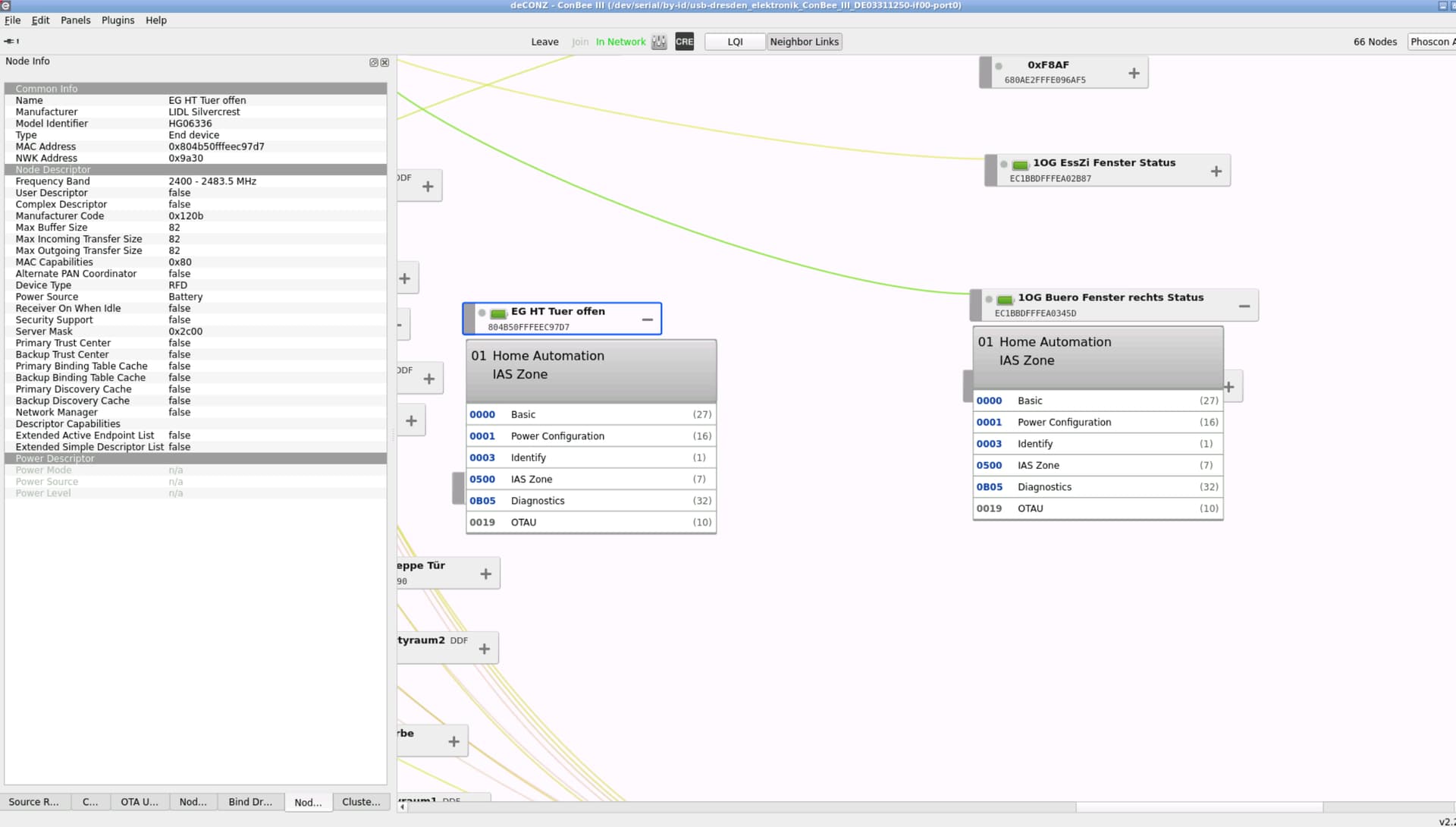
Thank you so far,
Stefan
Yeah can be an enrollement issue.
It’s possible to check it on the cluster 0x0500 but for me it’s better to add the support by DDF to this device.
I need the model ID and the manufacture name, not modified by code, If Im right it’s the “_TZ1800_ejwkn2h2”
Can make a tru with this DDF (need to delete and re-include the device, it was actually on legacy core)
{
  "schema": "devcap1.schema.json",
  "manufacturername": "_TZ1800_ejwkn2h2",
  "modelid": "TY0203",
  "vendor": "Tuya",
  "product": "LIDL Silvercrest HG06336",
  "sleeper": true,
  "status": "Gold",
  "subdevices": [
    {
      "type": "$TYPE_OPEN_CLOSE_SENSOR",
      "restapi": "/sensors",
      "uuid": [
        "$address.ext",
        "0x01",
        "0x0500"
      ],
      "fingerprint": {
        "profile": "0x0104",
        "device": "0x0402",
        "endpoint": "0x01",
        "in": [
          "0x0000",
          "0x0001",
          "0x0500"
        ]
      },
      "items": [
        {
          "name": "attr/id"
        },
        {
          "name": "attr/lastannounced"
        },
        {
          "name": "attr/lastseen"
        },
        {
          "name": "attr/manufacturername"
        },
        {
          "name": "attr/modelid"
        },
        {
          "name": "attr/name"
        },
        {
          "name": "attr/swversion"
        },
        {
          "name": "attr/type"
        },
        {
          "name": "attr/uniqueid"
        },
        {
          "name": "attr/zonetype"
        },
        {
          "name": "state/tampered"
        },
        {
          "name": "config/checkin"
        },
        {
          "name": "config/enrolled",
          "public": false
        },
        {
          "name": "config/on"
        },
        {
          "name": "config/pending"
        },
        {
          "name": "config/reachable"
        },
        {
          "name": "config/battery",
          "awake": true,
          "parse": {
            "at": "0x0021",
            "cl": "0x0001",
            "ep": 1,
            "eval": "Item.val = Attr.val / 2"
          }
        },
        {
          "name": "state/lastupdated"
        },
        {
          "name": "state/lowbattery"
        },
        {
          "name": "state/open"
        }
      ]
    }
  ],
  "bindings": [
    {
      "bind": "unicast",
      "src.ep": 1,
      "dst.ep": 1,
      "cl": "0x0001",
      "report": [
        {
          "at": "0x0021",
          "dt": "0x20",
          "min": 60,
          "max": 3600,
          "change": "0x00000001"
        }
      ]
    },
    {
      "bind": "unicast",
      "src.ep": 1,
      "dst.ep": 1,
      "cl": "0x0500"
    }
  ]
}
But now the problem, you are on HA, do you know how to use new DDF ?
You need to use the persistent folder, or a feature in Phoson, but I can’t explain the last one.