Very slow integration with Alexa

Following Franky’s deCONZ nginx Reverse Proxy Guide - Adjustments & Solutions

The post of Franky was spot-on. Solved the slow Alexa responds. I followed the guide, but had to do minor adjustments, hope it helps others, my setup was a little bit outdated :wink:

My Setup

  • Hardware: Raspberry Pi 4 Model B
  • OS: Raspbian Buster (Debian 10) - 32-bit armv7l
  • OpenSSL: 1.1.0i (had to update to 1.1.1n, to newer version to be able to generate the certificate)

Issues Encountered & Solutions

1. OpenSSL Version and -addext Flag

Problem: The certificate generation command failed with:

req: Unknown digest addext

Cause: Older OpenSSL version on Buster doesn’t support -addext flag

Solution: Updated OpenSSL (sudo apt install --only-upgrade openssl)

2. Multiple deCONZ Services Running

This was the main issue! The guide only mentions deconz.service, but three services were installed:

  • deconz.service (REST API) :white_check_mark:
  • deconz-gui.service (GUI version) :cross_mark:
  • deconz-wifi.service (WiFi service)

Problem: After configuring deconz.service correctly, deconz-gui.service was still running and holding port 443, preventing nginx from starting with:

nginx: [emerg] bind() to 0.0.0.0:443 failed (98: Address already in use)

Discovery:

sudo netstat -tulpn | grep deCONZ
# Showed TWO deCONZ processes on different ports!

systemctl list-units | grep deconz
# Revealed the multiple services

Solution:

# The GUI service won't stop gracefully (freezes), kill it directly
sudo pkill -9 -f "deCONZ.*gui"

# Disable it permanently
sudo systemctl disable deconz-gui

# Now nginx can start
sudo systemctl start nginx
sudo systemctl enable nginx

Note: You only need deconz.service running - it provides the same Phoscon web interface.

3. deCONZ Not Auto-Starting After Reboot

Problem: After reboot, only nginx started. deCONZ wasn’t enabled for auto-start.

Solution:

sudo systemctl enable deconz
sudo systemctl start deconz

4. Home Assistant Not Finding Zigbee Devices

Problem: After the setup, Home Assistant couldn’t find Zigbee devices.

Solution: Just restart Home Assistant. That’s it! No reconfiguration needed. Home Assistant automatically discovered the new WebSocket port after restart.

Final Configuration

Working setup:

  • deCONZ HTTP: Port 80 (internal)
  • deCONZ WebSocket: Port 8443
  • nginx HTTPS: Port 443 (external access via https://192.168.1.100 or http://192.168.1.100)

Verify everything:

sudo netstat -tulpn | grep LISTEN | grep -E ":(80|443|8443)"

Should show:

  • nginx on 443
  • deCONZ on 80 and 8443

Results

:white_check_mark: Access deCONZ via HTTPS or HTTP: https://192.168.1.100/pwa/index.html 192.168.1.100/pwa/index.html
:white_check_mark: Home Assistant: All Zigbee devices working (just needed restart)
:white_check_mark: Alexa: Working perfectly - no reconfiguration needed!
:white_check_mark: Self-signed certificate warning is expected (click “Advanced” → “Proceed”)

Key Takeaways

  1. Check for multiple deCONZ services - you likely only need deconz.service
  2. Don’t forget to enable services for auto-start
  3. Just restart Home Assistant - no integration reconfiguration needed
  4. Total setup time: ~30 minutes including troubleshooting

Thanks to Franky for the excellent guide! The slow Alexa response issue is completely solved.

1 Like

Hi all,
based on the great input of @Frankie and @koffeinschluck I created a Dockerfile that pulls the latest deconz image, installs nginx and applies the configuration discussed above. Running this image solves the alxa problem for my existing deconz installation. (I did not try adding new devices yet!)

Here is the Dockerfile:

FROM deconzcommunity/deconz:latest
ARG IP_ADDRESS="[DECONZ_IP_ADDRESS]"
RUN apt update
RUN apt install nginx -y

RUN /etc/init.d/nginx stop

RUN rm /etc/nginx/sites-enabled/default

# Generate private key
RUN openssl genrsa -out /etc/ssl/private/nginx-selfsigned.key 2048

# Create certificate (10 years)
RUN openssl req -new -x509 -days 3650 \
    -key /etc/ssl/private/nginx-selfsigned.key \
    -out /etc/ssl/certs/nginx-selfsigned.crt \
    -subj "/C=DE/ST=deconzSite/L=deconzLand/O=deconzOrg/CN=deconz" \
    -addext "subjectAltName=IP:$IP_ADDRESS,DNS:deconz,DNS:localhost"

RUN printf  "server { \n\
    listen 443 ssl; \n\
    server_name deconz IP:$IP_ADDRESS localhost; \n\
    # SSL certificate \n\
    ssl_certificate /etc/ssl/certs/nginx-selfsigned.crt; \n\
    ssl_certificate_key /etc/ssl/private/nginx-selfsigned.key; \n\
    # SSL configuration \n\
    ssl_protocols TLSv1.2 TLSv1.3; \n\
    ssl_ciphers ECDHE-RSA-AES128-GCM-SHA256:ECDHE-RSA-AES256-GCM-SHA384; \n\
    ssl_prefer_server_ciphers on; \n\
    # Reverse proxy to port 80 \n\
     \n\
    " >> /etc/nginx/sites-available/reverse-proxy
RUN  printf  'location / { \n\
        proxy_pass http://localhost:80; \n\
        proxy_set_header Host $host; \n\
        proxy_set_header X-Real-IP $remote_addr; \n\
        proxy_set_header X-Forwarded-For $proxy_add_x_forwarded_for; \n\
        proxy_set_header X-Forwarded-Proto $scheme; \n\
        # Timeout settings \n\
        proxy_connect_timeout 30s; \n\
        proxy_read_timeout 60s; \n\
        proxy_send_timeout 60s; \n\
    } \n\
}' >> /etc/nginx/sites-available/reverse-proxy
RUN cat /etc/nginx/sites-available/reverse-proxy
# Activate configruation
run ln -s /etc/nginx/sites-available/reverse-proxy /etc/nginx/sites-enabled/

# Test syntax
run nginx -t
run /etc/init.d/nginx start

Replace [DECONZ_IP_ADDRESS] with the IP of your deconz instance

You can build the image and check the output with

docker build . --no-cache --build-arg IP_ADDRESS=[DECONZ_IP_ADDRESS] --progress=plain

Furhter, I created a docker compose script to deploy a container from the image.

version: "3"
services:
  deconz:
    build: 
      context: .
#      args:
#        IP_ADDRESS= [DECONZ_IP_ADDRESS]
      dockerfile: Dockerfile
    network_mode: host # Not Tested in compose yet - Needed to set discovery ip to the ip of the host machine 
    container_name: deconz
    restart: always
    privileged: true # This is important! Without it, the deCONZ image won't be able to connect to Conbee II.
    ports:
      - 80:80
      - 443:443
      - 8443:8443
      - 5900:5900
      - 6080:6080
    volumes:
      - [YOUR_MOUNT_PATH]:/opt/deCONZ
    devices:
      - /dev/ttyACM0 # This is the USB device that Conbee II is running on.
    environment:
      - TZ=Europe/Berlin
      - DECONZ_WEB_PORT=80
      - DECONZ_WS_PORT=8443
      - DEBUG_INFO=1
      - DEBUG_APS=0
      - DEBUG_ZCL=0
      - DEBUG_ZDP=0
      - DEBUG_OTA=0
      - DEBUG_HTTP=0
      - DECONZ_DEVICE=/dev/ttyACM0 # This is the USB device that Conbee II is running on.
      - DECONZ_START_VERBOSE=0
      - DECONZ_VNC_MODE=1
      - DECONZ_VNC_PASSWORD=test

Note that the placeholder [YOUR_MOUNT_PATH] needs to be changed to your settings.

As you can see, I tried to pass the [DECONZ_IP_ADDRESS] build ARG via the compose file but could not make docker compose run properly. Maybe someone with better knowledge on docker compose can fix this.

I would be happy if that is useful for some of you.

Looks professional, where can I get something similar for an [Raspberry Pi 4, 4GB RAM] with phoscon image + iobroker (Debian)? Many thanks in advance?

For iobroker and their deconz addon you need one additional port at your nginx conf

server {
    listen 8444; 
    location / {           
        proxy_pass http://127.0.0.1:8443;
        proxy_http_version 1.1;
        proxy_set_header Upgrade $http_upgrade;
        proxy_set_header Connection $connection_upgrade;
        proxy_set_header Host $host;
    }

and add that port for websocket

grafik

FYI: Support WebSockets over HTTPS and HTTP port by manup · Pull Request #8359 · dresden-elektronik/deconz-rest-plugin · GitHub

Can please someone explain what to do that alexa is working normaly with the deconz container.

Hello. I am running deconz in a docker container and I am struggling with what environment variables I have to change to make deconz work with alexa again. Could someone explain please?

Here my auto installing docker solution, maybe its helping

Compose

services:
  deconz:
    image: deconzcommunity/deconz:2.30.2
    container_name: deconz
    stdin_open: true
    tty: true
    hostname: deconz
    restart: unless-stopped
    privileged: true
    ports:
      - "80:80"      # Für deCONZ direkt (Phoscon App & UPnP)
      - "443:443"    # Für NGINX (Alexa)
      - "8444:8444"  # Port für NGINX (iobroker)

    networks:
      macvlan:    
        ipv4_address: 192.168.1.241
        mac_address: "02:42:00:01:02:41"

    volumes:
      - '/container-data/deconz:/opt/deCONZ'
      
      # NGINX Zertifikate und Startscript
      - '/container-data/deconz/nginx/conf/entrypoint.sh:/entrypoint.sh:ro'
      - '/container-data/deconz/nginx/conf/nginx.conf:/etc/nginx/nginx.conf:ro'
      - '/container-data/deconz/nginx/certs:/certs:ro'

    devices:
      - /dev/ttyACM0 

    # Container muss als 'root' starten, damit das entrypoint.sh Skript Software installieren darf
    user: root
    
    # Standard-Startbefehl durch Automatisierungs-Skript ersetzen
    entrypoint: /entrypoint.sh

    environment:
      - DEBIAN_FRONTEND=noninteractive
      - TZ=Europe/Berlin
      - PATH=/usr/local/sbin:/usr/local/bin:/usr/sbin:/usr/bin:/sbin:/bin
      - DEBUG_INFO=1      
      - DECONZ_WEB_PORT=80
      - DECONZ_WS_PORT=8443      
      # 'user: root' kollision
      # - DECONZ_GID=1000
      # - DECONZ_UID=1000
      - DECONZ_APPDATA_DIR=/opt/deCONZ
      - DECONZ_BAUDRATE=0
      - DECONZ_DEV_TEST_MANAGED=0
      - DECONZ_NOVNC_PORT=6080
      - DECONZ_UPNP=1
      - DECONZ_DEVICE=/dev/ttyACM0
      - DECONZ_START_VERBOSE=0
      - DECONZ_VNC_DISABLE_PASSWORD=0
      - DECONZ_VNC_DISPLAY=0
      - DECONZ_VNC_MODE=1
      - DECONZ_VNC_PASSWORD=*******
      - DECONZ_VNC_PASSWORD_FILE=0
      - DECONZ_VNC_PORT=5900

networks:
  macvlan:
    external: true

entrypoint.sh

#!/bin/sh
set -e

# Installiere NGINX
if ! command -v nginx > /dev/null; then
  apt-get update && apt-get -y -o Dpkg::Options::="--force-confold" install nginx
fi

# Starte NGINX als Hintergrundprozess
nginx -g "daemon off;" &

# originale deCONZ-Startskript als Hauptprozess ausführen.
exec /start.sh

nginx.conf

user www-data;
worker_processes auto;
pid /run/nginx.pid;
events {}

http {
    map $http_upgrade $connection_upgrade { default upgrade; '' close; }

    # HTTPS auf Port 443 für ALEXA
    server {
        listen 443 ssl;
        ssl_certificate /certs/zertifikat-pub-deconz-nginx.pem;
        ssl_certificate_key /certs/zertifikat-key.pem;

        location / {
            proxy_pass http://127.0.0.1:8443;
            proxy_http_version 1.1;
            proxy_set_header Upgrade $http_upgrade;
            proxy_set_header Connection $connection_upgrade;
            proxy_set_header Host $host;
        }
    }

    # HTTP auf Port 8443 für IOBROKER
    server {
        listen 8444;

        location / {
            proxy_pass http://127.0.0.1:8443;
            proxy_http_version 1.1;
            proxy_set_header Upgrade $http_upgrade;
            proxy_set_header Connection $connection_upgrade;
            proxy_set_header Host $host;
        }
    }
}

Thank you for your help! If I don’t get this wrong this is the config for the solution with a nginx reverse proxy.
The developers implemented a fix for this problem in version 2.32.0. I am struggling to get it to work, because I don’t know how to configure it. I would be grateful if someone could help me out.

The initial HTTPS support in the last version unfortunately had some issues getting it work in some setups. This is fixed in the upcoming version. I can’t test the Alexa connection since my Echo refuses to finish setup to my WiFi.

From a container perspective the internal HTTPS port 443 needs to be exposed to the outside.

Hi manup, can you please explain more in detail? I am using deconz now for more than 4 years and everthing was fine. Now since August it is not working as expected and now I read you answer. Which upcoming version are you talking about? Firmware? Docker? and how do I have to expose the HTTPS port 443?

Hi Holger, the release is out now in the beta channel.

https://github.com/dresden-elektronik/deconz-rest-plugin/releases/tag/v2.32.1-beta

From deCONZ side the HTTPS port 443 should be used automatically – if it isn’t used otherwise by another program.

How is your setup, are you using the community Docker container or native installation?
https://github.com/deconz-community/deconz-docker/blob/main/docker-compose.yml

It already exposes the 443 port and should work. I think the - DECONZ_WS_PORT=443 can be omitted with new deCONZ version as Websockets are now automatically work over HTTP/S ports.

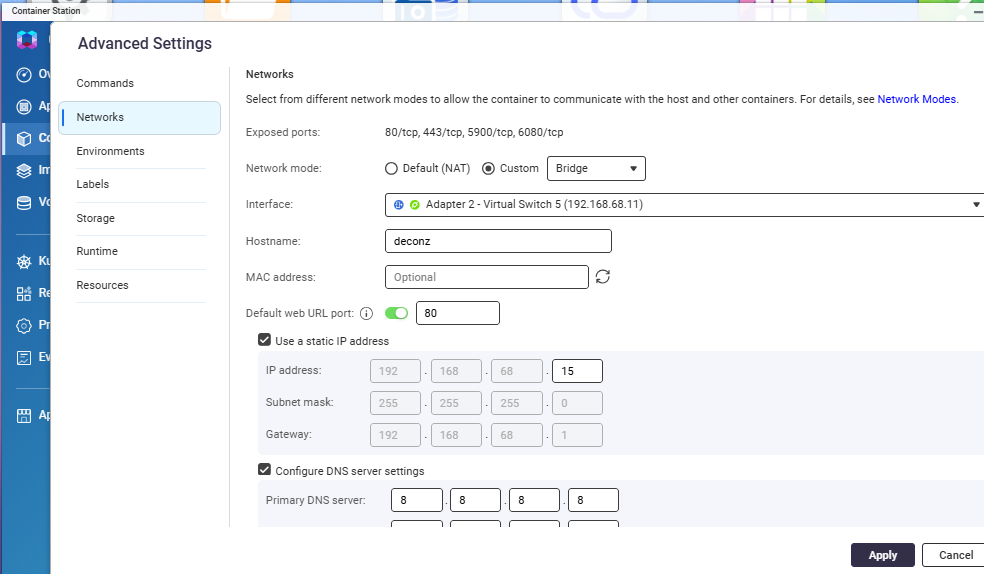
I am using deCONZ on my Qnap Discstation TS-253D with Container Station.

I’m afraid I can’t help much since I have no experience with how it works with Qnap.
Might be worth to check if the 443 port is already reachable from outside of the container:

curl -k -vv https://192.168.68.19/api

I am using Beta 2.32.1. curl returns:

*   Trying 192.168.xxx.xxx:443...
* Connected to 192.168.xxx.xxx (192.168.xxx.xxx) port 443
...
 Request completely sent off
< HTTP/1.1 403 Forbidden
< Access-Control-Allow-Origin: *
< Content-Type: application/json; charset=utf-8
< Content-Length: 70
<
* Connection #0 to host 192.168.xxx.xxx left intact
[{"error":{"address":"/","description":"unauthorized user","type":1}}]%

Still no devices with Alexa are found. I also use deconz in a docker container, WS_Port is set to 8443 for iobroker. According to curl, 443 seems to be accessible from outside, but I get a 403 forbidden error.

In addition, accessing the Phoscon interface via https is very slow. Resources are loaded very slowly.

Hi.
I’m also using 2.32.1 in a Docker Container. WS-Port set to 8443 for ioBroker. Curl get this result:

ALPN: server did not agree on a protocol. Uses default.

  • Server certificate:

  • subject: CN=localhost

  • start date: Oct 24 05:27:48 2025 GMT

  • expire date: Oct 14 05:27:48 2067 GMT

  • issuer: CN=localhost

  • SSL certificate verify result: self signed certificate (18), continuing anyway.

  • using HTTP/1.x

GET /api HTTP/1.1

Host: 192.168.1.72

User-Agent: curl/8.7.1

Accept: /

  • Request completely sent off

< HTTP/1.1 403 Forbidden

< Access-Control-Allow-Origin: *

< Content-Type: application/json; charset=utf-8

< Content-Length: 70

<

  • Connection #0 to host 192.168.1.72 left intact

[{“error”:{“address”:“/”,“description”:“unauthorized user”,“type”:1}}]%


When trying to find new devices with the Alexa-App the container crash!? But device control via voice comand and alexa still works.

Thank you for your work!

The Container regulary crashs every 15 minutes. I think this ist Alexa in the backround looking for new devices.

The entry in the log for termination:

*** bit out of range 0 - FD_SETSIZE on fd_set ***: terminated

After that the container restarts.

Any news on this?

Hey guys,
same problem here. The deconz container crashes after round about 15-16 minutes with the error

*** bit out of range 0 - FD_SETSIZE on fd_set ***: terminated

and restarts. Anyone any ideas what could trigger this behavior?

Ah and btw. deleting all Devices from the Alexa app and trying to reconnect them does not work anymore. All devices are inaccessible. My Home Assistant deconz integration works without problems, except the 15-16 minutes timer that makes the devices inaccessible when the container restarts.