I’m doing it from my smartphone and I can’t find how to do it. I can’t find submit PR. I’m giving up.

It’s fine^^, I can see 2 PR.
Have added a comment on the last one, you can make the change just with editing the file deconz-rest-plugin/general.xml at patch-2 · Cadkey/deconz-rest-plugin · GitHub
Or can answer on the PR if you want to comment.
My PR was apparently not accepted. I made the change, without conviction.
Don’t worries, the first one was valided realy fast because the double line was an issue.
There is no reason for the second one will be not valided, it’s device specific, so it don’t have impact on other users.
If in 1 week it was not valided, I will ask myself to others devs if there is a problem with it
I’m keeping an eye on the general.xml file update.
When is the next deCONZ update planned?
I assume it will be a beta version?
Ha yes right, the actual version have the change (v2.30.3 and 1 month old) but this version is just a draft.
The change will be for sure in next version, but beta or stable …
The previous one was a stable because lot of important changes, and enought time for tests, no way to be sure but yes I think too it will be a Beta.
Okay thanks, but my question was about the deadline.
When should the next version arrive? Thanks
Hello not working, for me.
I am single-phase, my meter is standard, I do not have the instantaneous consumption feedback, nor the injected quantity which is correctly displayed on the meter. My current DDF is this one which works except that it does not display the injection.
thanks.
{
“schema”: “devcap1.schema.json”,
“manufacturername”: “LiXee”,
“modelid”: “ZLinky_TIC”,
“product”: “ZLinky_TIC Standard+Base”,
“sleeper”: false,
“status”: “Gold”,
“subdevices”: [
{
“type”: “$TYPE_POWER_SENSOR”,
“restapi”: “/sensors”,
“uuid”: [
“$address.ext”,
“0x01”,
“0x0b04”
],
“items”: [
{
“name”: “attr/id”
},
{
“name”: “attr/lastannounced”
},
{
“name”: “attr/lastseen”
},
{
“name”: “attr/manufacturername”
},
{
“name”: “attr/modelid”
},
{
“name”: “attr/name”
},
{
“name”: “attr/swversion”
},
{
“name”: “attr/type”
},
{
“name”: “attr/uniqueid”
},
{
“name”: “config/on”
},
{
“name”: “config/reachable”
},
{
“name”: “state/current”,
“refresh.interval”: 300,
“read”: {
“at”: “0x0508”,
“cl”: “0x0b04”,
“ep”: 1,
“fn”: “zcl”
},
“parse”: {
“at”: “0x0508”,
“cl”: “0x0b04”,
“ep”: 1,
“eval”: “if (Attr.val != 65535) { Item.val = Attr.val; }”
}
},
{
“name”: “state/lastupdated”
},
{
“name”: “state/power”,
“refresh.interval”: 300,
“read”: {
“at”: “0x050f”,
“cl”: “0x0b04”,
“ep”: 1,
“fn”: “zcl”
},
“parse”: {
“at”: “0x050f”,
“cl”: “0x0b04”,
“ep”: 1,
“eval”: “if (Attr.val != -32768) { Item.val = Attr.val; }”
}
},
{
“name”: “state/voltage”,
“refresh.interval”: 300
}
]
},
{
“type”: “$TYPE_CONSUMPTION_SENSOR”,
“restapi”: “/sensors”,
“uuid”: [
“$address.ext”,
“0x01”,
“0x0702”
],
“items”: [
{
“name”: “attr/id”
},
{
“name”: “attr/lastannounced”
},
{
“name”: “attr/lastseen”
},
{
“name”: “attr/manufacturername”
},
{
“name”: “attr/modelid”
},
{
“name”: “attr/name”
},
{
“name”: “attr/swversion”
},
{
“name”: “attr/type”
},
{
“name”: “attr/uniqueid”
},
{
“name”: “config/on”
},
{
“name”: “config/reachable”
},
{
“name”: “state/consumption”,
“refresh.interval”: 300,
“read”: {
“at”: “0x0100”,
“cl”: “0x0702”,
“ep”: 1,
“fn”: “zcl”
},
“parse”: {
“at”: “0x0000”,
“cl”: “0x0702”,
“ep”: 1,
“eval”: “Item.val = Attr.val”
}
},
{
“name”: “state/lastupdated”
}
]
},
{
“type”: “ZHAAlarm”,
“restapi”: “/sensors”,
“uuid”: [
“$address.ext”,
“0x01”,
“0xff66”
],
“items”: [
{
“name”: “attr/id”
},
{
“name”: “attr/lastannounced”
},
{
“name”: “attr/lastseen”
},
{
“name”: “attr/manufacturername”
},
{
“name”: “attr/modelid”
},
{
“name”: “attr/name”
},
{
“name”: “attr/swversion”
},
{
“name”: “attr/type”
},
{
“name”: “attr/uniqueid”
},
{
“name”: “config/on”
},
{
“name”: “config/reachable”
},
{
“name”: “state/alarm”,
“refresh.interval”: 300,
“read”: {
“at”: “0x0005”,
“cl”: “0xff66”,
“ep”: 1,
“fn”: “zcl”
},
“parse”: {
“at”: “0x0005”,
“cl”: “0xff66”,
“ep”: 1,
“eval”: “Item.val = Attr.val > 0 ? true : false”,
“fn”: “zcl”
},
“default”: false
},
{
“name”: “state/lastupdated”
}
]
}
],
“bindings”: [
{
“bind”: “unicast”,
“src.ep”: 1,
“cl”: “0x0B04”,
“report”: [
{
“at”: “0x0508”,
“dt”: “0x21”,
“min”: 60,
“max”: 300,
“change”: “0x00000001”
},
{
“at”: “0x050F”,
“dt”: “0x21”,
“min”: 60,
“max”: 300,
“change”: “0x00000001”
}
]
},
{
“bind”: “unicast”,
“src.ep”: 1,
“cl”: “0x0702”,
“report”: [
{
“at”: “0x0100”,
“dt”: “0x23”,
“min”: 60,
“max”: 300,
“change”: “0x00000001”
}
]
},
{
“bind”: “unicast”,
“src.ep”: 1,
“cl”: “0xFF66”,
“report”: [
{
“at”: “0x0005”,
“dt”: “0x21”,
“min”: 60,
“max”: 300,
“change”: “0x00000001”
}
]
}
]
}
You are not using my DDF that I posted or modify your own?
And this is normal because the state.xxx.item.json files were not added in the PR. You must add them yourself.
Furthermore, the Lixee firmware has been improved with a ‘tariffPeriod’ cluster that instantly reports rate changes, should you need an instant status.
Here’s what my usage is like. I’m in history mode and Tempo, but it works in standard mode, of course and production.
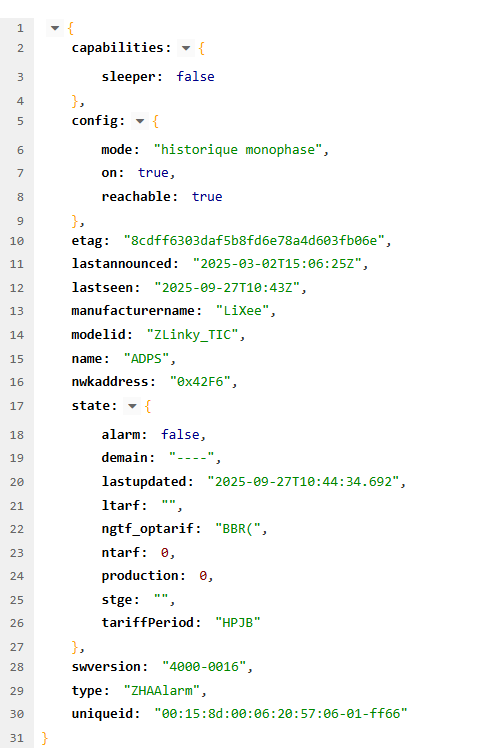
Here you have the “universal” DDF created by @Cadkey
Else For standard you can enable the DDF called “zlinky_tic_standard_mono_base.json”
And add this part to the DDF
        {
          "name": "state/production",
          "refresh.interval": 360,
          "read": {
            "at": "0x0001",
            "cl": "0x0702",
            "ep": 1,
            "fn": "zcl"
          },
          "parse": {
            "at": "0x0100",
            "cl": "0x0702",
            "ep": 1,
            "eval": "Item.val = Attr.val"
          }
        },
(And if you can, delete other DDF for lixee, they will be re-created on next update, but you will be sure not having conflicts during your tests)
You can see all the data uploaded by the Lixee in the screenshot above, some are uploaded in Historical mode, others in Standard mode. There are also the 6 consumption indexes that are uploaded depending on your tariff, only one in Base, 2 in Hphc and 6 in Tempo. If you want other information to be uploaded, I can see what I can do.
I also made a script that automatically restores the state.xxx.item.json files when they are deleted by a deCONZ update as was the case recently. The paths need to be adapted to your system. In my case, deCONZ works in Docker on Synology.
Script PHP:
function fix_lixie_files() {
### check update
$path = ‘/volume1/@docker/btrfs/subvolumes/’, ‘/usr/share/deCONZ/zcl/’, ‘/usr/share/deCONZ/devices/generic/items/’, ‘/volume1/docker/deconz_backup/items/’];
$scan = scandir($path[0]);
foreach ($scan as $num => $name) if (file_exists($path[0].$name.$path[1].‘general.xml’) && !str_contains($name, ‘-init’) && !str_contains($scan[$num+1], ‘-init’)) break;
$jsonPath = $path[0].$name.$path[2]; // state.xxx.item.json folder
$items = [‘state_demain_item.json’, ‘state_ltarf_item.json’, ‘state_ngtf_optarif_item.json’, ‘state_ntarf_item.json’, ‘state_stge_item.json’, ‘state_tariffPeriod_item.json’];
if (file_exists($jsonPath.$items[5])) return;
echo date(‘d/m/Y H:i:s’).’ nouvelle version du container deCONZ, installation des fichiers state_xxx_item.json pour Zlinky…‘.“\n”;
foreach ($items as $item) if (!file_exists($jsonPath.$item)) copy($path[3].$item, $jsonPath.$item);
echo date(‘d/m/Y H:i:s’).’ Les fichiers state.xxx.item ont été ajoutés. Arrêter/Réinitialiser/Démarrer le container…'.“\n”;
send_mail($wp.‘Les fichiers state.xxx.item ont été ajoutés’, “
”.‘Arreter le container, Réinitialiser puis relancer le container.’.“
\n”);
}