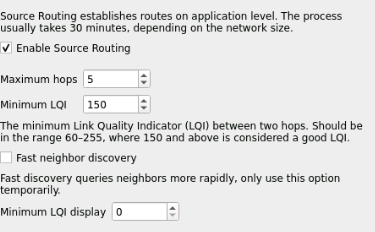
I am running deconz on a conbee 2 using the addon of home assistant with a raspberry pi.
Recently i discovered the source routing config, which is really great and improves the stability of my network a lot.
My problem is: the config will never be stored when i either do a restart of the plugin or ha itself.
I read about a config file that i have to change, but i can not even find that file.
I also checked the code of the deconz core and found those settings are only stored on a proper deconstruction of the controller, but i cant not really debug if this is happening when restarting or not.
It would be really great to get this issue solved, as it really decreases my user experience as i have to reset the source routing on every restart and wait for the source routing discovery
The configuration from the UI should be stored in the config.ini file.
Is that file writable by deCONZ? Sometimes there are cases where the ownership is root from starting with sudo etc., might be worth to check with ls -l config.ini
The config can also be edited manually while deCONZ is not running.
For example here are my settings for enabled source routing:
This is what makes it very hard for me to check and access the config file in the first place. As the other settings are picked up, i assume that either those are corretly stored in the container, and the config file is not, or the other configs are stored in a location that is mapped to the raspbees storage, whereas the location of the config file is not
The code is now changed so that source routing configuration changes are stored after a 10 second delay. This should fix the issue that configuration isn’t stored if deCONZ isn’t closed proper.
I found this thread because recently I have troubles with my IKEA TRADFRI LED controllers. after about 8h they start losing connection.
I copied the config.ini from the running deconz_addon container, edited the section [source-routing] on my pc and put the config.ini back inside the container at /data/.local/share/dresden-elektronik/deCONZ/config.ini
After restarting the container all changes to the config.ini went away. how to edit it so that it keeps my changes to the [source-routing] section?
When I use the terminal and go into the deconz-container, open the config.ini the file is reset after one reboot of the container despite my changes.
When I use deconz VNC plugin via Home Assistant I can see this (my actually settings that I changed):