I’m experiencing difficulties pairing a Nous E8 Zigbee Smart Smoke Sensor with my deCONZ gateway. Although the device seems to enter its intended pairing mode, the sensor is never discovered by Phoscon.
The observed behavior is as follows:
I start the sensor search in the Phoscon App.
I press and hold the button on the Nous E8 for approximately 5–7 seconds.
The red LED starts blinking.
After about 5–15 seconds, the red LED light extinguishes, and nothing happens. The sensor isn’t found in Phoscon.
Observation (for reference): If I press the button without an active sensor search in Phoscon, the red LED blinks for approximately 30–40 seconds before stopping.
The sensor simply fails to connect and is not recognized. Since the device does not appear in the deCONZ GUI, I cannot read the Model ID or Manufacturer Name, which prevents me from creating a formal Device Request (DDF) on GitHub.
My setup details:
Device: Nous E8 Zigbee Smart Smoke Sensor (Tuya)
Coordinator: ConBee II
ConBee II Firmware: 26780700
deCONZ/Gateway Version: 2.31.2
Operating System: Raspberry Pi Zero 2 W (main setup) and Windows 11 25H2 (test only)
Has anyone successfully paired this Nous E8 model and can confirm the required button sequence, or perhaps suggest which pairing category in Phoscon (e.g., Lights, Sensors, Switches) is the best one to try? I suspect the device is not joining the network correctly at all.
Yep.
Phoscon display it only if it was in the API, but the device NEED to be visible in the GUI if included.
And the category have no impact on the GUI.
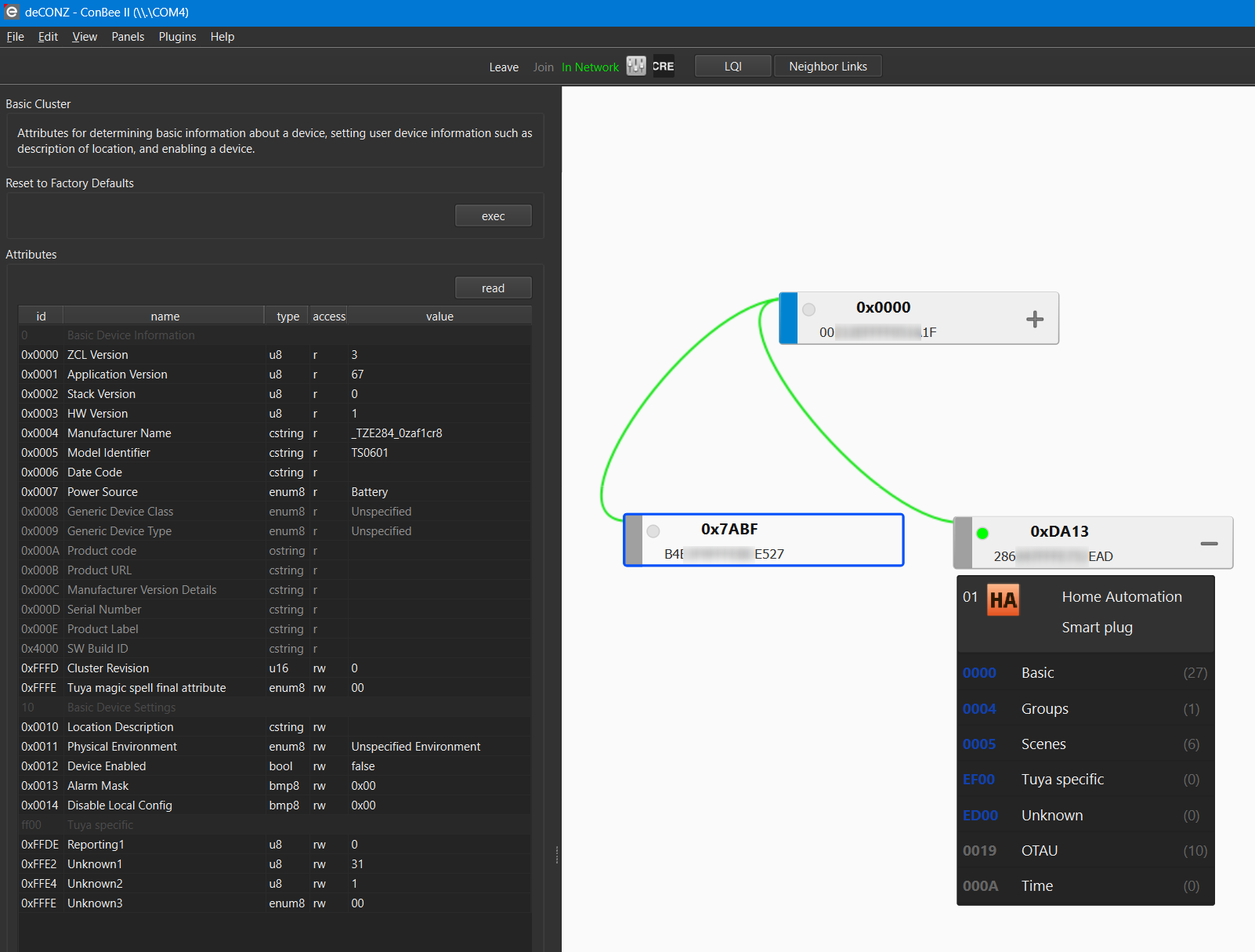
After resetting Deconz and only trying to add the E8, two more nodes (0x7ABF, 0xDA13) appeared in the node list. Is it possible that two nodes were incorrectly detected?
I must have overlooked them in my production environment, which was my main problem creating a device request.
Validation test performed:
On node 0xDA13, I read the attributes via “Attributes > read.” Then the node LED in the Deconz GUI flashes blue. If I remove the battery from the smoke detector and execute “Read” again, the LED in node 0xDA13 flashes red. I interpret this as the “unreachable” status. If I reinsert the battery, the LED flashes blue again for “read.” Therefore, I assume it’s the smoke detector.
So I’ll try creating a new device request using the information from the screenshot.
Yes, when you rest the device it trigger a new inclusion, so you will have a new Network ID (the 0xXXXX number), the previous one will be grayed after a time (not connected).
But on your capture you have 2 differents Mac adress, so it’s realy 2 differents devices.