ConBee III Fails to Initialize on Raspberry Pi 5 Boot with Other USB Serial Devices

Hi everyone,

I’m writing to report a repeatable bug I’m experiencing with a new ConBee III on a Raspberry Pi 5. The issue appears to be a race condition or resource conflict during boot, as the stick fails to initialize only when other specific USB-to-serial devices are also connected. I’m hoping the deCONZ team can investigate and that this post might help others with similar setups.

Summary of the Issue

The ConBee III is not detected by the deCONZ software if the Raspberry Pi 5 is booted with an RFXtrx433XL and a TellStick Duo also connected. This issue did not occur with my older ConBee I or ConBee II sticks in the identical hardware setup.

My Environment

  • Host Device: Raspberry Pi 5 (Model: 8GB)
  • Operating System: Home Assistant OS (2025.9.4)
  • Core: 2025.9.4
  • Supervisor: 2025.09.0
  • Operating System 16.2
  • deCONZ Software: deCONZ Add-on for Home Assistant (8.2.0)
  • deCONZ Hardware: ConBee III
  • Firmware Version: 26550900
  • Other Connected USB Devices (Conflicting):
    • RFXCOM RFXtrx433XL
    • TellStick Duo

Steps to Reproduce the Bug

  1. Connect the ConBee III, RFXtrx433XL, and TellStick Duo to the USB ports of a Raspberry Pi 5.
  2. Power on or reboot the Raspberry Pi 5.
  3. Check the deCONZ add-on logs after Home Assistant has started.

Expected Behavior

The deCONZ add-on should start successfully and establish a connection with the ConBee III, making the Zigbee network available.

Actual Behavior

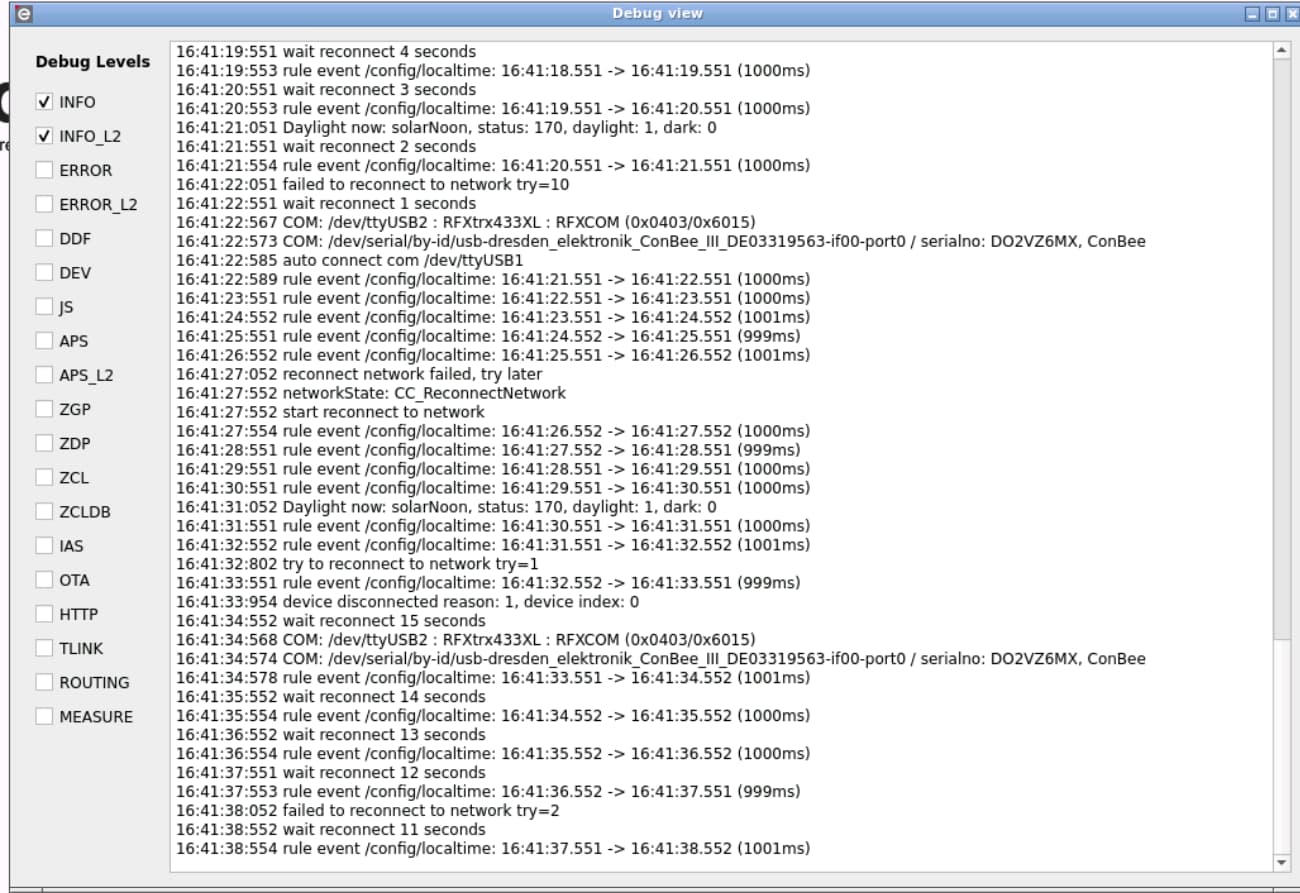
The deCONZ add-on fails to start, reporting that it cannot find or connect to the ConBee III device. The Zigbee network remains completely offline. I have attached a screenshot of the deCONZ add-on log output showing the specific error messages below.

Confirmed Workaround

There is a reliable workaround, which points to this being a timing issue at boot:

  1. Start the Raspberry Pi 5 with only the ConBee III connected.
  2. Wait for Home Assistant and the deCONZ add-on to fully start. Confirm the ConBee III is working and the Zigbee network is online.
  3. Once it’s running, hot-plug the RFXtrx433XL and TellStick Duo. Following this sequence, all three devices operate together correctly without any issues.

Troubleshooting Steps I’ve Already Tried

To rule out common issues, I have confirmed the problem still occurs even when:

  • Using an official 5V/5A Raspberry Pi 5 power supply.
  • Connecting all devices through their own powered USB hub.
  • Using both the USB 2.0 and USB 3.0 ports on the Pi.
  • Using a 1-meter shielded USB 2.0 extension cable for the ConBee III to prevent potential interference.

Questions for the deCONZ Team & Community

Could you please provide guidance on this issue?

  1. Are there any known firmware updates for the ConBee III that might address USB enumeration conflicts on platforms like the Raspberry Pi 5?
  2. Is there a recommended udev rule or a deCONZ configuration parameter that could help? For example, to delay the add-on start until USB enumeration is fully complete or to enforce a stable device path.
  3. Has anyone else in the community found a different workaround for running multiple serial devices alongside a ConBee III on an RPi 5?

I can provide any output or deCONZ logs needed to help diagnose this further.

Thanks in advance for your time and help!
Petter

Not a bug, moving to correct place.

It seems your device disconnects normally, meaning it seems to be pulled from usb .

Another reason for this, could be that you have not enough power.

Are you able to test with a better psu?

Hi Mimiix,

Thank you for your reply and for the suggestions. I appreciate you taking the time to help.

Based on your feedback, I’ve done some more testing and have a few new details that I hope will be useful for our investigation.

Regarding the Power Supply

To explore your suggestion about power, I’ve confirmed two key things about my setup:

  1. The Raspberry Pi itself is powered by an upgraded 65W USB-C PD adapter.
  2. The other two USB devices (RFXCOM RFXtrx433XL and TellStick Duo) are connected to a separate, externally powered USB hub that has its own 15W (5.0V / 3A) adapter.

With the Pi having a very strong power supply and the other devices being powered independently, it seems that a power shortage is a very unlikely cause for this particular issue.

A More Precise Observation of the Behavior

I also have a clearer observation of the behavior that I think paints a complete picture:

When the system boots with all devices connected, the deCONZ log simply shows that the service is running but has not successfully connected to the ConBee III. It seems to be waiting or stuck.

The telling part is what happens next: the moment I unplug the powered hub containing the other two USB devices, the deCONZ log immediately updates to show a successful connection to the ConBee III. This happens instantly and automatically, without me needing to restart the add-on.

And here is the final crucial detail: after the ConBee III is connected and running, I can plug the hub with the RFXtrx433XL and TellStick Duo back in. They then initialize perfectly, and all three devices run together correctly without any issues.

Given this full sequence—where all devices run fine together as long as the ConBee III is allowed to initialize first—I am wondering if the root cause might be something other than power. Could this point towards a software-level resource conflict or a USB enumeration challenge that happens specifically at boot time?

The fact that my older ConBee II stick works perfectly in the exact same setup also seems to be a significant detail.

I am very keen to help get to the bottom of this. Please let me know what other information or logs (like dmesg) would be most useful for you.

Thank you for your guidance and continued help.
Petter

Hi,

Seems like there is something with the initialization. Perhaps also due to the USB hub in between.

@de_employees maybe you can provide some insights

Hi,

Thank’s for the assistance and interest. I have tested both with and without the hub, its still the same behavior.
I actually started without the hub.

Gratefully
Petter

Could you please share your DeCONZ add-on settings within HomeAssistant? The add-on should not see other USB devices, as it runs in a containerized environment.

Hi Haerteleric,

I do not know if this is what you mean, but there is only one line, in the deCONZ add-on

device: /dev/serial/by-id/usb-dresden_elektronik_ConBee_III_DE03319563-if00-port0

Gratefully
Petter

Hi Haerteleric,

Thank you for your continued help.

First, I want to confirm that the YAML I posted earlier is indeed my complete configuration for the add-on. It’s a very minimal setup with just that one device line.

I agree completely with your assessment that the issue is likely happening at the Host OS level, outside of the container. To help with the investigation, I have captured a dmesg log.

This specific log shows the sequence of events during my successful workaround. Here is a breakdown of what is happening in the log below:

  • At the start (around timestamp 108388), I restart the deCONZ add-on while all devices are connected. The add-on fails to connect to the ConBee III.
  • Around timestamp 108448, I physically unplug the hub containing the RFXtrx433XL and TellStick Duo. At this exact moment, the deCONZ add-on successfully connects to the ConBee III (this connection event itself isn’t in the dmesg, but it’s when it happens).
  • From timestamp 108470 onwards, I plug the hub back in, and you can see the RFXtrx and TellStick devices being correctly re-detected by the system. After this, all three devices work perfectly together.

Here is the log snippet:

[108388.592500] hassio: port 10(veth0f407ef) entered disabled state
[108388.592621] veth46d044c: renamed from eth0
[108388.652619] hassio: port 10(veth0f407ef) entered disabled state
[108388.653192] veth0f407ef (unregistering): left allmulticast mode
[108388.653200] veth0f407ef (unregistering): left promiscuous mode
[108388.654087] hassio: port 10(veth0f407ef) entered disabled state
[108388.915310] hassio: port 10(vethf8f963a) entered blocking state
[108388.915333] hassio: port 10(vethf8f963a) entered disabled state
[108388.915368] vethf8f963a: entered allmulticast mode
[108388.915527] vethf8f963a: entered promiscuous mode
[108388.945134] eth0: renamed from veth7c97328
[108388.946193] hassio: port 10(vethf8f963a) entered blocking state
[108388.946202] hassio: port 10(vethf8f963a) entered forwarding state
[108448.187899] ftdi_sio ttyUSB2: usb_serial_generic_read_bulk_callback - urb stopped: -32
[108448.188263] ftdi_sio ttyUSB2: usb_serial_generic_read_bulk_callback - urb stopped: -32
[108448.382070] usb 1-2.4.1: USB disconnect, device number 21
[108448.382167] ftdi_sio ttyUSB2: error from flowcontrol urb
[108448.382762] ftdi_sio ttyUSB2: FTDI USB Serial Device converter now disconnected from ttyUSB2
[108448.382801] ftdi_sio 1-2.4.1:1.0: device disconnected
[108451.198461] usb 1-2.1: USB disconnect, device number 19
[108470.101600] usb 1-2.4.1: new full-speed USB device number 23 using xhci-hcd
[108470.217535] usb 1-2.4.1: New USB device found, idVendor=0403, idProduct=6015, bcdDevice=10.00
[108470.217547] usb 1-2.4.1: New USB device strings: Mfr=1, Product=2, SerialNumber=3
[108470.217551] usb 1-2.4.1: Product: RFXtrx433XL
[108470.217554] usb 1-2.4.1: Manufacturer: RFXCOM
[108470.217556] usb 1-2.4.1: SerialNumber: DO2VZ6MX
[108470.224614] ftdi_sio 1-2.4.1:1.0: FTDI USB Serial Device converter detected
[108470.224667] usb 1-2.4.1: Detected FT-X
[108470.228081] usb 1-2.4.1: FTDI USB Serial Device converter now attached to ttyUSB2
[108472.401478] usb 1-2.1: new full-speed USB device number 24 using xhci-hcd
[108472.517150] usb 1-2.1: New USB device found, idVendor=1781, idProduct=0c31, bcdDevice= 6.00
[108472.517161] usb 1-2.1: New USB device strings: Mfr=1, Product=2, SerialNumber=3
[108472.517164] usb 1-2.1: Product: TellStick Duo
[108472.517167] usb 1-2.1: Manufacturer: Telldus
[108472.517170] usb 1-2.1: SerialNumber: A703AIV4

As I review this, I realize that this log shows the recovery and not the initial failure. It might be more useful for you to see the dmesg output from a complete system reboot where the ConBee III fails to initialize in the first place.

I am happy to do a cold boot of the Pi with all devices connected and provide that entire log if you think it would help pinpoint the problem.

Please let me know how you’d like to proceed.

Gratefully,

Petter

Thanks for the clear description — that helps narrow things down a lot.

Just to clarify up front: the deCONZ add-on in Home Assistant isn’t maintained by us directly. However, based on your observations, the issue is almost certainly happening at the Host OS / udev level, before deCONZ itself actually fails.


What’s Important to Check

All three of your USB devices use FTDI-based serial bridges, so the kernel assigns /dev/ttyUSB* numbers in the order they initialize.

The device you configure:

/dev/serial/by-id/usb-dresden_elektronik_ConBee_III_DE03319563-if00-port0

…is just a symlink created by udev, which normally points to something like /dev/ttyUSB0 or /dev/ttyUSB1.

You can verify that at any time with:

ls -la /dev/serial/by-id/

This makes it visible if the underlying target changes while deCONZ is running.


How to Observe udev Activity in Real Time

To see whether the ConBee symlink or tty assignment changes at the moment things start working, you can monitor udev events while doing your “unplug the hub” trick:

udevadm monitor --subsystem-match=tty --property

Then:

  1. Start the deCONZ add-on in the “stuck” state
  2. While the monitor is running, unplug the hub
  3. Watch for any add, remove, or change events related to ttyUSB* or FTDI devices

Alternatively, kernel events alone can be observed with:

dmesg --follow

If you capture the output from those two commands during that transition moment, it should tell us more on what is happening.

Hi Haerteleric,

Following your expert guidance, I have completed the investigation, and I believe we have found the definitive root cause of the issue. Your suggested commands were instrumental in uncovering what was happening behind the scenes.

First, running ls -la /dev/serial/by-id/ was very revealing. It not only confirmed your theory about the ttyUSB* symlinks but also brought to my attention that I had another ttyUSB device connected which I had overlooked – a Home Assistant ZBT-1 stick. This meant there was even more competition at boot than I had initially reported.

The real breakthrough came from analyzing the full dmesg from a boot with all devices connected. I managed to capture a log from a boot that eventually succeeded, and it revealed two critical things:

  1. There was a massive 10-minute delay between the end of the kernel’s startup (~9 seconds) and when the Home Assistant services began to load (~614 seconds).
  2. The cause of this delay was clear in the device initialization sequence: The TellStick Duo was detected by the USB system, but its serial driver failed to attach, and it never received a ttyUSB* assignment.

Based on this, I performed one final, conclusive test: I rebooted the system with the TellStick Duo completely disconnected.

The result was a perfect, fast boot. The 10-minute delay was gone, and all my other devices, including the ConBee III, started immediately and have been stable ever since.

This confirms that the TellStick Duo was creating a kernel-level driver conflict, which in turn was causing the system-wide stall and blocking the ConBee III from being accessible to deCONZ. The ConBee III was simply a victim of the instability caused by another device.

I cannot thank you enough for your time, patience, and expertise. This has been a fantastic learning experience in collaborative troubleshooting. Your valuable input led us directly to the source of a very complex problem, and for that, I am extremely grateful.

Best regards
Petter