I’m having trouble pairing a temperature/humidity sensor that seems to be identified as a Zbeacon TH01 (apparently a white-label variant of the Sonoff SNZB-02).
Environment:
deCONZ 2.31.2
ConBee II
What happens:
The device joins the Zigbee network successfully - I can see it in deCONZ
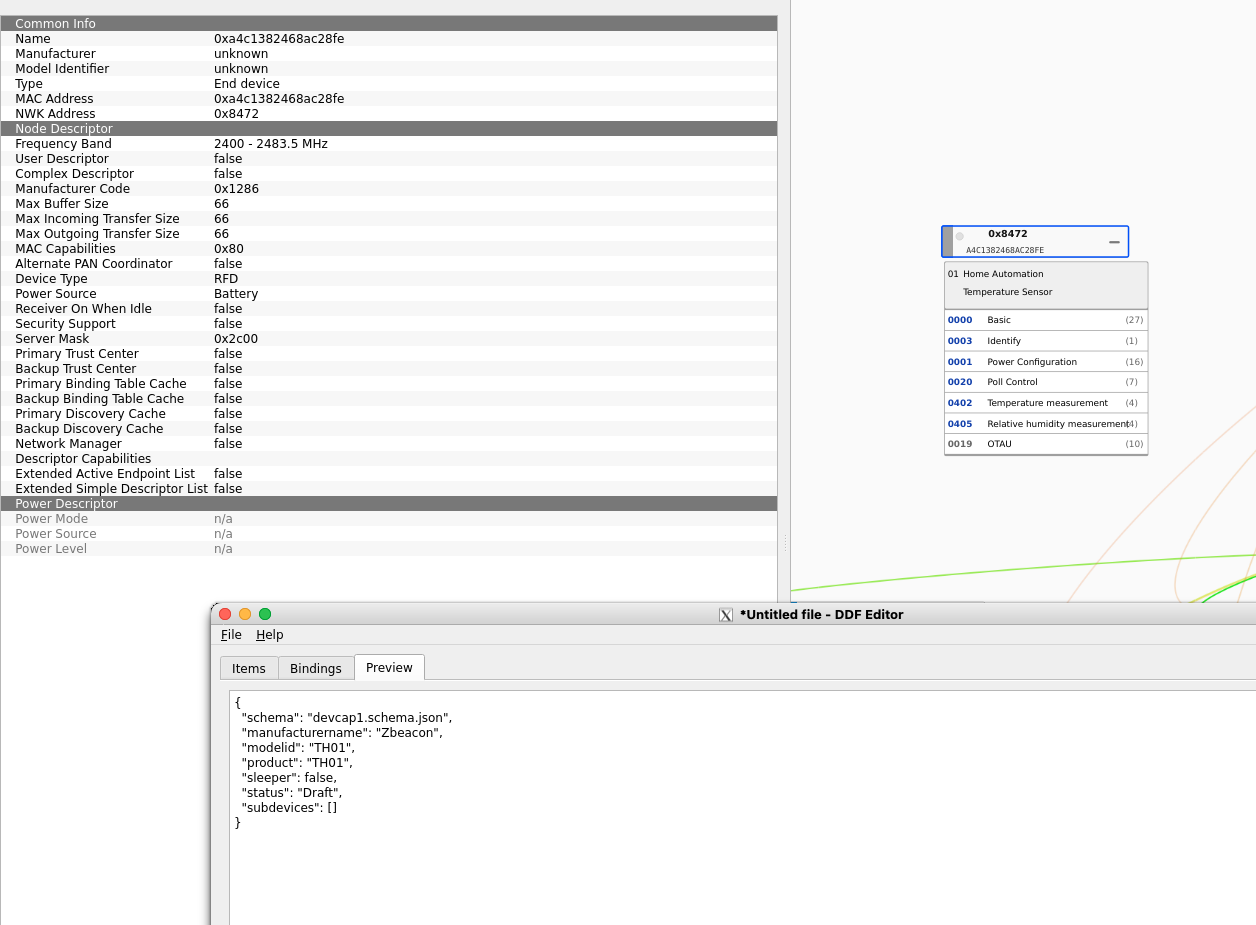
In the deCONZ network view it is recognized as a “Temperature Sensor”.
I removed and re-paired the device multiple times with the same result.
Is this a known issue with the TH01 DDF? The empty subdevices array looks suspicious to me and I’m wondering whether that’s the reason no REST API / Phoscon sensor gets created.
I also attached a screenshot of deConz with apparently all info I could get:
BTW: Adding devices in deconz is only possible via phsocon webUI, right? I did start device pairing there. Claude suggested that, since this is a battery sensor, I should keep pushing the reset button on the device over and over so that it transmits more info…?
If you want to get the missing information, you can press the “read” button on the GUI in same time you awake the device with short press on the button.
Here’s what I ended up doing in case it helps someone else:
I’m on a native Debian VM install (deCONZ 2.31.2), not HA. I grabbed the JSON directly from the GitHub repo and dropped it into my user DDF folder (~/.local/share/dresden-elektronik/deCONZ/devices/). One thing that wasn’t obvious at first: the DDF/.json-file references an external script (tuya_swversion.js), so I had to download that file from the same repo folder and put it next to the JSON - otherwise it wouldn’t have worked. After that I restarted the deconz service, ran a sensor search in Phoscon and woke the device up (battery out/in), and it showed up within ~2 seconds. yay!
A couple of follow-up questions which I didn’t understand though:
What exactly is the DDF store / the Deconz Toolbox you linked? When I downloaded from that store page I got a .ddb file instead of a .json, and my DDF editor’s File → Open only accepts .json. How was I supposed to handle that .ddb bundle — is there a separate import step for it?
Would a general update of my deCONZ (I’m on 2.31.2) have shipped this DDF automatically, so I wouldn’t have needed to add it manually?
One small heads-up: the GitHub link you posted probably didn’t work directly because of the leading underscore in the filename — the URL got mangled. I had to navigate to the file manually / use the Raw link to get the actual JSON.
I’m on a native Debian VM install (deCONZ 2.31.2), not HA
Sorry for the “troll Mode” but it’s the answser.
The DDF store is made mainly for HA user, for you the operation take 5mn and 2/4 command line but for them it’s almost impossible. Their OS is based on docker, docker are so “so easy to use” but it’s realy complicated to just edit a text file, something natural for you, and most of them don’t know how work a docker, so not possible for them to just create a json file in a folder. It’s easier for users on the official docker, they have less problem to use the shared folder, but classic HA users need “more support”…
But the “deconz tool page” can have other utilities than load DDB. I never use a DDB on my side.
You can import *.DDB using Phoscon, Phoscon can only use DDB, it don’t support json.
About the (2) It depend when the DDF was updated and the version you are using but if you install the last version, the v2.33.1-beta (2 days old), you will have it for sure. All new DDF are included on new Deconz version.
And for the url, you are right too, IDK where is from the bad character, have made a copy/paste … (and have updated the link, sorry)
Ohhh you’re right, Phoscon itself CAN load DDFs. Hah! I oversaw that! That would’ve been probably WAY simpler than placing the json+js into my user folder (although that was also very simple. Don’t get me wrong, I am a deCONZ noob - if it runs, I leave it alone. But other than that I know my stuff ok. ).
Thanks for the elaboration about the HA docker users. I didn’t know about that.
 yay!
yay! ).
).