Blitzwolf BW-SHP13: Configure light indicator?

Hi,

according to Tuya TS011F_plug_1 control via MQTT | Zigbee2MQTT the Blitzwolf-BW-SHP13 smart plug allows for configuring the light indicator that shows whether the plug is on or off.

Is it possible using deCONZ to perform this configuration?
I know I read somwhere once that you can send configurations to devices, but I don’t remember how that works. I also do not know if it would work for this device specifically.

Thanks!

Yes, I can try to add it to the DDF.
What is exactly your device ? (Need the manufacture Name)

One of them ?

  "manufacturername": [
    "_TZ3000_3ooaz3ng",
    "_TZ3000_g5xawfcq",
    "_TZ3000_amdymr7l",
    "_TZ3210_amdymr7l"
  ],

Awesome!
The device is _TZ3000_g5xawfcq.

I happen to also have another plug with the name “_TZ3000_gvn91tmx”.
This one is not Blitzwolf, but Aubess, I believe.

Maybe these also support setting the indicator light?

So it seem the _TZ3000_g5xawfcq have the model ID “TS0121” so not the same device.
I can’t found wich one version is the _TZ3000_gvn91tmx

But you can make a test for all, just add to the corresponding DDF

        {
          "name": "config/ledindication",
          "refresh.interval": 86400,
          "parse": {
            "at": "0x8001",
            "cl": "0x0006",
            "ep": 1,
            "eval": "if (Attr.val == 0) { Item.val = false; } else { Item.val = true; }",
            "fn": "zcl:attr"
          },
          "read": {
            "fn": "none"
          },
          "write": {
            "at": "0x8001",
            "cl": "0x0006",
            "dt": "0x30",
            "ep": 1,
            "eval": "if (Item.val) { Attr.val = 3; } else { Attr.val = 0; }",
            "fn": "zcl:attr"
          },
          "default": false
        },

This command will enable or disable the LED.

If it don’t work, you can use the GUI to check if it work, select the node then

  • Cluster “on/off”
  • Attribute 0x8001 “Back Light mode”
  • Choose your option from the 4 possibles.

Thanks for the instructions.
I’ve extended the DDF, although I have no way of knowing whether it actually works.
I remember reading somewhere how to send configurations to a device via the REST API, but I can’t find that anymore.

I did finally get deCONZ GUI running (it’s normally running headless on a server) and connected via VNC.

On both the plugs I mentioned above, I was able to change that attribute to “Off”.
Funnily enough, I only had changed one of the DDFs.
So, I guess the attribute can be changed in the GUI regardless of the DDS change?

With the API, you have a sample here Tuya Fingerbot _TZ3210_j4pdtz9v TS0001 stay on/off · Issue #8358 · dresden-elektronik/deconz-rest-plugin · GitHub

But you have changed the option on the node direclty using the GUI ? and both ?
And no, the DDF have priority on the GUI change.

Ok, I’ve now verified that the DDF change was successful. I can see in the GUI that the modified DDF is used.
The REST API responds this:

frank@futro:~$ curl http://localhost/api/64C43CC9AD/lights/12/ 2>/dev/null | jq
{
  "capabilities": {
    "alerts": [
      "none",
      "select",
      "lselect"
    ],
    "sleeper": false
  },
  "config": {
    "groups": [
      "0",
      "22",
      "15"
    ],
    "ledindication": false
  },
  "etag": "0ad5054c18d61e407db8ed2d4821461c",
  "hascolor": false,
  "lastannounced": "2021-01-17T15:37:44Z",
  "lastseen": "2025-10-26T13:16Z",
  "manufacturername": "_TZ3000_g5xawfcq",
  "modelid": "TS0121",
  "name": "Steckdose MiniPC",
  "nwkaddress": "0xA67E",
  "state": {
    "alert": "none",
    "on": true,
    "reachable": true
  },
  "swversion": "1.0.1",
  "type": "Smart plug",
  "uniqueid": "84:2e:14:ff:fe:35:9d:11-01"
}

This shows the ledindication config option.
But setting (writing) the option actually does not work:

frank@futro:~$ curl -H 'Content-Type: application/json' -X PUT -d '{"ledindication":1}' http://localhost/api/64C43CC9AD/lights/12/config
[{"error":{"address":"/lights/12/config/ledindication","description":"parameter, ledindication, not available","type":6}}]%                                                  frank@futro:~$ curl -H 'Content-Type: application/json' -X PUT -d '{"ledindication":3}' http://localhost/api/64C43CC9AD/lights/12/config
[{"error":{"address":"/lights/12/config/ledindication","description":"parameter, ledindication, not available","type":6}}]%                                                  frank@futro:~$ curl -H 'Content-Type: application/json' -X PUT -d '{"ledindication":"3"}' http://localhost/api/64C43CC9AD/lights/12/config
[{"error":{"address":"/lights/12/config/ledindication","description":"parameter, ledindication, not available","type":6}}]%                                                  frank@futro:~$ curl -H 'Content-Type: application/json' -X PUT -d '{"ledindication":true}' http://localhost/api/64C43CC9AD/lights/12/config
[{"error":{"address":"/lights/12/config/ledindication","description":"parameter, ledindication, not available","type":6}}]%                                                  frank@futro:~$ curl -H 'Content-Type: application/json' -X PUT -d '{"ledindication":1}' http://localhost/api/64C43CC9AD/lights/12/config
[{"error":{"address":"/lights/12/config/ledindication","description":"parameter, ledindication, not available","type":6}}]%                                                  frank@futro:~$ curl -H 'Content-Type: application/json' -X PUT -d '{"ledindication":"true"}' http://localhost/api/64C43CC9AD/lights/12/config
[{"error":{"address":"/lights/12/config/ledindication","description":"parameter, ledindication, not available","type":6}}]%

Same with “true” (without quote) instead of 1 ?

Ok it’s normal, need the whitelist new field for “light” entry, so need to put this part in a “sensor” entry.

Try to put this code part in the TYPE_POWER_SENSOR entry instead of the TYPE_SMART_PLUG.

Sorry for the late reply, had to battle a cold for a week :confused:

I’ve modified the DDF and moved the config section to TYPE_POWER_SENSOR, as suggested.
Unfortunately, it still does not perform as expected.
Using numbers as values for ledindication produces an error:

frank@futro:~$ curl -H 'Content-Type: application/json' -X PUT -d '{"ledindication":1}' http://localhost/api/64C43CC9AD/sensors/43/config
[{"error":{"address":"/sensors/43/config/ledindication","description":"invalid value, 1, for parameter ledindication","type":7}}]

true and false do not produce an error, but the actual (physical) state of the light does not change:

frank@futro:~$ curl -H 'Content-Type: application/json' -X PUT -d '{"ledindication":true}' http://localhost/api/64C43CC9AD/sensors/43/config
[{"success":{"/sensors/43/config/ledindication":true}}]%                                                                                                                                frank@futro:~$ curl http://localhost/api/64C43CC9AD/sensors/43 2>/dev/null | jq
{
  "capabilities": {
    "sleeper": false
  },
  "config": {
    "ledindication": true,
    "on": true,
    "reachable": true
  },
  "ep": 1,
  "etag": "4b5083759d923599c284d7e3be6a2b72",
  "lastannounced": "2021-01-17T15:37:44Z",
  "lastseen": "2025-10-31T10:40Z",
  "manufacturername": "_TZ3000_g5xawfcq",
  "modelid": "TS0121",
  "name": "Power 43",
  "nwkaddress": "0xA67E",
  "state": {
    "current": 307,
    "lastupdated": "2025-10-31T10:35:21.363",
    "power": 60,
    "voltage": 226
  },
  "swversion": "1.0.1",
  "type": "ZHAPower",
  "uniqueid": "84:2e:14:ff:fe:35:9d:11-01-0b04"
}

It’s better, not the same message “invalid value, 1, for parameter ledindication”

This is because you are using “int” type instead of “bool”, use true or false.

true and false do not produce an error, but the actual (physical) state of the light does not change:

Can be from my code, or the device don’t support it.
The value is modified in the API ?

Have you tried with the GUI ? To see if the device support it ?

The device does support switching the LED on and off. Via the GUI it works as expected.
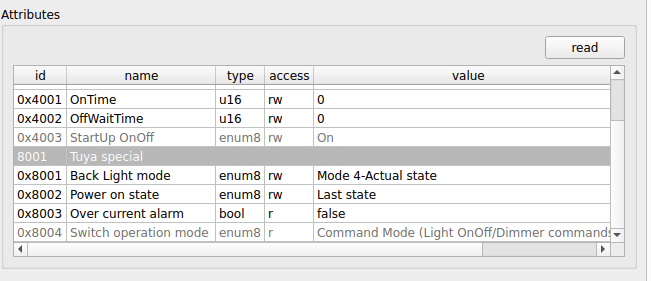
These are the attributes I see in the 0006 cluster:

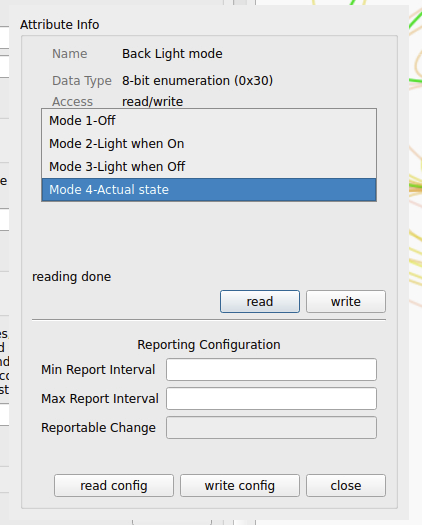
When I double-click 0x8001 Back Light mode, I get this:

I’m not sure what “Mode4” does.
zigbee2mqtt states:

The possible values are: off, off/on, on/off

I m checking the DDF, all seem fine, perhaps it’s because I m using value 3, can try this code


        {
          "name": "config/ledindication",
          "refresh.interval": 86400,
          "parse": {
            "at": "0x8001",
            "cl": "0x0006",
            "ep": 1,
            "eval": "if (Attr.val == 0) { Item.val = false; } else { Item.val = true; }",
            "fn": "zcl:attr"
          },
          "read": {
            "fn": "none"
          },
          "write": {
            "at": "0x8001",
            "cl": "0x0006",
            "dt": "0x30",
            "ep": 1,
            "eval": "if (!Item.val) { Attr.val = 0; } else { Attr.val = 1; }",
            "fn": "zcl:attr"
          },
          "default": false
        },

If you take a look on deonz log, with flag “info” + “info_l2” + “DDF” and change the value using the GUI, you will see deconz updating the API using DDF.

These messages come up in the log when I change the value from the GUI:

15:13:18:356 84:2e:14:ff:fe:35:9d:11-01-0b04/config/ledindication expression: if (Attr.val == 0) { Item.val = false; } else { Item.val = true; } --> true
15:13:18:357 [INFO] - No button map for: TS0121, unicast to: 0x0000, endpoint: 0x01, cluster: ONOFF (0X0006), command: ATTRIBUTE_REPORT (0X0A), payload: 01803002, zclSeq: 95
15:13:18:357 ZCL attribute report 0x842E14FFFE359D11 for cluster: 0x0006, ep: 0x01, frame control: 0x08, mfcode: 0x0000 
15:13:18:357 	payload: 01803002
[...]
15:13:23:415 84:2e:14:ff:fe:35:9d:11-01-0b04/config/ledindication expression: if (Attr.val == 0) { Item.val = false; } else { Item.val = true; } --> true
15:13:23:416 [INFO] - No button map for: TS0121, unicast to: 0x0000, endpoint: 0x01, cluster: ONOFF (0X0006), command: ATTRIBUTE_REPORT (0X0A), payload: 01803001, zclSeq: 96
15:13:23:417 ZCL attribute report 0x842E14FFFE359D11 for cluster: 0x0006, ep: 0x01, frame control: 0x08, mfcode: 0x0000 
15:13:23:417 	payload: 01803001
[...]
15:13:27:801 84:2e:14:ff:fe:35:9d:11-01-0b04/config/ledindication expression: if (Attr.val == 0) { Item.val = false; } else { Item.val = true; } --> true
15:13:27:803 [INFO] - No button map for: TS0121, unicast to: 0x0000, endpoint: 0x01, cluster: ONOFF (0X0006), command: ATTRIBUTE_REPORT (0X0A), payload: 01803003, zclSeq: 97
15:13:27:803 ZCL attribute report 0x842E14FFFE359D11 for cluster: 0x0006, ep: 0x01, frame control: 0x08, mfcode: 0x0000 
15:13:27:803 	payload: 01803003
[...]
15:13:31:756 84:2e:14:ff:fe:35:9d:11-01-0b04/config/ledindication expression: if (Attr.val == 0) { Item.val = false; } else { Item.val = true; } --> false
15:13:31:760 [INFO] - No button map for: TS0121, unicast to: 0x0000, endpoint: 0x01, cluster: ONOFF (0X0006), command: ATTRIBUTE_REPORT (0X0A), payload: 01803000, zclSeq: 98
15:13:31:761 ZCL attribute report 0x842E14FFFE359D11 for cluster: 0x0006, ep: 0x01, frame control: 0x08, mfcode: 0x0000 
15:13:31:761 	payload: 01803000
15:13:31:761 Websocket 192.168.178.140:63550 send message: {"config":{"ledindication":false,"on":true,"reachable":true},"e":"changed","id":"43","r":"sensors","t":"event","uniqueid":"84:2e:14:ff:fe:35:9d:11-01-0b04"} (ret = 156)

When I use the REST API:

15:17:11:130 84:2e:14:ff:fe:35:9d:11-01-0b04/config/ledindication expression: if (Item.val) { Attr.val = 3; } else { Attr.val = 0; } --> 3
15:17:11:130 writeZclAttribute, ep: 0x01, cl: 0x0006, attr: 0x8001, type: 0x30, mfcode: 0x0000
15:17:11:189 Websocket 192.168.178.140:63550 send message: {"attr":{"lastseen":"2025-11-02T14:17Z"},"e":"changed","id":"12","r":"lights","t":"event","uniqueid":"84:2e:14:ff:fe:35:9d:11-01"} (ret = 130)
15:17:11:190 Websocket 127.0.0.1:41446 send message: {"attr":{"lastseen":"2025-11-02T14:17Z"},"e":"changed","id":"12","r":"lights","t":"event","uniqueid":"84:2e:14:ff:fe:35:9d:11-01"} (ret = 130)
15:17:11:202 84:2e:14:ff:fe:35:9d:11-01-0b04/config/ledindication expression: if (Attr.val == 0) { Item.val = false; } else { Item.val = true; } --> true
15:17:11:204 [INFO] - No button map for: TS0121, unicast to: 0x0000, endpoint: 0x01, cluster: ONOFF (0X0006), command: ATTRIBUTE_REPORT (0X0A), payload: 01803003, zclSeq: 107
15:17:11:204 ZCL attribute report 0x842E14FFFE359D11 for cluster: 0x0006, ep: 0x01, frame control: 0x08, mfcode: 0x0000 
15:17:11:204 	payload: 01803003
15:17:11:205 SC config/ledindication: synced
15:17:11:205 SC --> StateFinished
15:17:11:205 SC state change finished: 84:2e:14:ff:fe:35:9d:11-01-0b04

[...]

15:17:17:162 84:2e:14:ff:fe:35:9d:11-01-0b04/config/ledindication expression: if (Item.val) { Attr.val = 3; } else { Attr.val = 0; } --> 0
15:17:17:162 writeZclAttribute, ep: 0x01, cl: 0x0006, attr: 0x8001, type: 0x30, mfcode: 0x0000
15:17:17:194 Daylight now: solarNoon, status: 170, daylight: 1, dark: 0
15:17:17:226 84:2e:14:ff:fe:35:9d:11-01-0b04/config/ledindication expression: if (Attr.val == 0) { Item.val = false; } else { Item.val = true; } --> false
15:17:17:228 [INFO] - No button map for: TS0121, unicast to: 0x0000, endpoint: 0x01, cluster: ONOFF (0X0006), command: ATTRIBUTE_REPORT (0X0A), payload: 01803000, zclSeq: 108
15:17:17:228 ZCL attribute report 0x842E14FFFE359D11 for cluster: 0x0006, ep: 0x01, frame control: 0x08, mfcode: 0x0000 
15:17:17:229 	payload: 01803000
15:17:17:229 SC config/ledindication: synced
15:17:17:229 SC --> StateFinished
15:17:17:230 SC state change finished: 84:2e:14:ff:fe:35:9d:11-01-0b04

When changing the value via REST API, and then checking in the GUI, the “Back Light mode” is set to Mode 4 - Actual state when I send true, and to Mode 1 - Off when I set the value to false.

The REST API apparently does not support all 4 states, and sending true does nothing, actually.

15:17:11:130 84:2e:14:ff:fe:35:9d:11-01-0b04/config/ledindication expression: if (Item.val) { Attr.val = 3; } else { Attr.val = 0; } --> 3

Try the new code

"eval": "if (!Item.val) { Attr.val = 0; } else { Attr.val = 1; }",

instead of

"eval": "if (Item.val) { Attr.val = 3; } else { Attr.val = 0; }",

Like that the value will move from 0<>1, so “off”<>“on if light on”